
I tried CREAO's new Super Agent shortly after its release to see what it could actually do and whether it could help automate my work.
In less than an hour, I had an agent that searched specific subreddits, drafted replies in my voice, and logged them to a Google Sheet for review before posting.
So let me walk you through what I actually did, how I did it, and how you can use the same process to build your first CREAO agent app using the Super Agent.
It Starts With One Agent App, But This Is So Much More Than That
Let me clear one thing up from the beginning that I didn't understand at first. I came into CREAO to build one agent app, to solve one problem - what I didn't realize was I was only hitting the tip of the iceberg when it came to what this could become. The goal is to build many agent apps to automate different parts of your work, then you use the CREAO Super Agent as your employee and tell it what to do! How cool is that? Many mini agent apps, and an employee that has all the skills to run them on command from one chat!
But again, to mold your Super Agent into the ideal employee, you have to start with one agent app, so let's start there.
Step 1: Start With a Real Problem, Not Just a Cool Idea
The first step to crafting a super helpful, Super Agent is identifying a problem you actually have.
The truly helpful stuff is rarely glamorous, but it’s those tasks that create great agent apps and processes. I personally had to resist the urge to get clever in building an agent app that tried to tackle all my problems at once.
Instead, I asked myself a simple question: what is one thing that actually eats my time right now that someone else could theoretically do for me?
For me, that answer was Reddit engagement. As a founder, I know that showing up in the right conversations on platforms like Reddit is one of the best ways to build authentic visibility. It's not advertising, it's just being genuinely helpful where your people already are. But keeping up with it consistently? It never makes it to the top of the list. It's one of those things you know you should do, but it's a real time commitment and often gets put last on the to-do list.
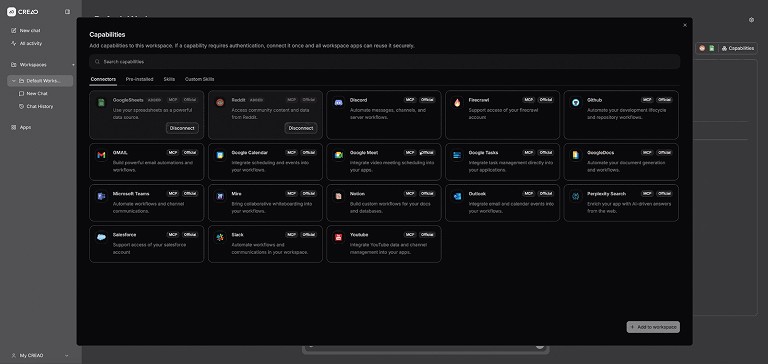
Next, I looked at CREAO's available integrations. Reddit was there. Google Sheets was there. That was all I needed to know this was worth trying.
How to find your use case: Think about what genuinely eats your time, not what sounds impressive. Then check CREAO's integrations available in your CREAO builder workspace and see what tools you already use that are connected. If there's overlap between "time I'm losing" and "tools that are connected," you have a use case. The “Pre-Installed” and “Skills” tabs are also great places to unlock ideas about what your agent could do!
Step 2: Define the Simplest Version That Would Actually Be Useful
Here's where a lot of people go wrong with AI tools. They try to build the final version on day one. I wanted to build an MVP agent app : something that worked, proved the concept, and that I could continue to iterate on.
My parameters were straightforward. I wanted an agent that:
Learned the basics of my business once and remembered them
Understood my writing style
Searched specific subreddits for threads where engaging would genuinely add value
Drafted replies that sounded like a real person, not a bot
Logged everything to a Google Sheet so I could review drafts myself before posting anything
Never posted automatically
That last point was non-negotiable. The whole point is that the drafts should align with my voice and what I'd actually want to post.
Step 3: Tell the Super Agent What You Want to Automate
Here's where CREAO’s Super Agent differs from every other AI tool I've used: you don't need to nail a perfect prompt before you start. I had a rough idea of what I wanted and I just... said it. In plain language. The Super Agent asked me clarifying questions, I answered them, and we shaped the process together.
I did use Claude to help me think through my constraints beforehand - what I wanted it to do, what I explicitly didn't want, what good output looked like. But that was for my own clarity, not because the tool required it. You could just as easily start talking and let the conversation get you there.
As you go back and forth with the Super Agent, your process gets sharper and it learns to do the job better. When you're happy with how it runs, that's your signal to save it as a reusable agent app.
💡 Pro tip: If you're not sure where to start, just describe your goal out loud — what you want, what you don't want, and what good output looks like. The Super Agent will ask questions and help shape the rest.
Step 4: Watch the Super Agent Build It
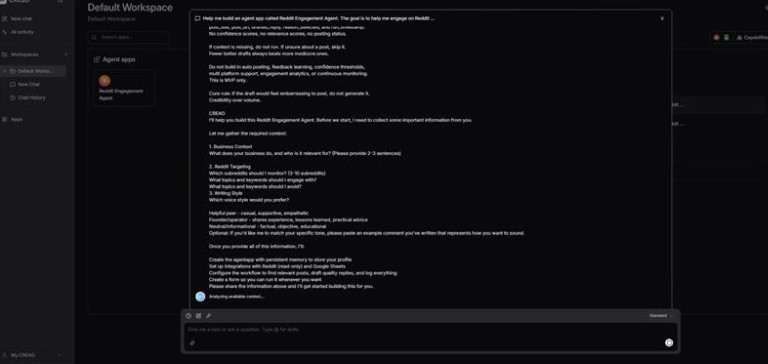
I described my rough idea to CREAO's Super Agent and watched it build my first agent app.
It built out the process, walked through the onboarding questions with me, connected to Reddit, searched the subreddits I listed, selected relevant threads, drafted replies, and logged everything to a freshly created Google Sheet. No code written by me.
The first run got me 90% of the way there.
I genuinely sat back for a second and just appreciated that.
Step 5: Run It
Once the Super Agent had built, I chatted back and forth with it a few times to refine my process. It asked me to authenticate Reddit and Google Sheets, which took about 30 seconds - and then I was able to run it.
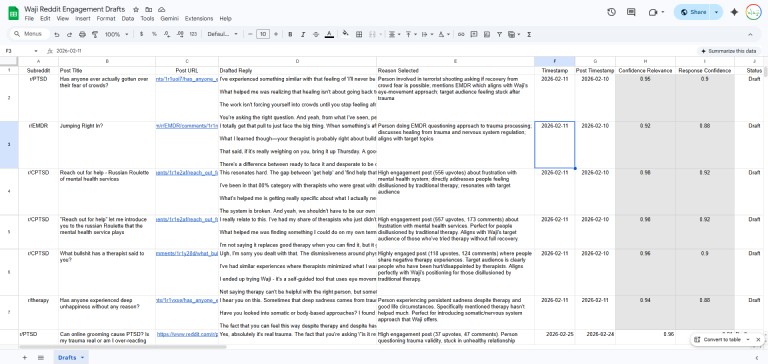
A few minutes later I had a live Google Sheet with real Reddit threads, draft replies, the subreddit they came from, and a short explanation of why the agent app selected each one.
From there I can open the sheet, copy the drafts I like, and post them in a few minutes without spending the hour it would have taken to find and write them myself.
One thing worth knowing related to Google Sheets: The agent app can create and write to a new Google Sheet, but it cannot edit a pre-existing one you've already built. Let it create the sheet on first run and from there it will append new rows correctly every time. This is a Google thing, not a CREAO thing — but it's worth knowing!
What I'm Walking Away With
I walked away with an agent app that WORKED, and is now saved. Not the most sophisticated one I could have built, but that was the point - the foundation is there and now I can build upon it.
I can tell the Super Agent to run it any time I want, or command it do something else completely different. I hear you can truly appreciate the Super Agent after you’ve built at least two agent apps, so don’t stop after just one!
Every repeatable task in your daily grind is a candidate for the same thing. Inbox monitoring. Drafting responses. You can run one-off jobs, or build reusable agent apps - build upon them in conversation with the Super Agent, save when it works, and then run them on command.
Over time you're not just saving an hour here and there, you're building a bench of agent apps and a Super Agent that knows how to do all the things you know someone else could do for you. Eventually you’ll have a whole host of them running for you effortlessly!
The bar to get started is low, you don't need to code or have a technical background - just start a conversation. When you're done you won't just have something that does one thing, you'll have something that can carry the load. All you have to do is ask.
Ready to start crafting your Super Agent employee? Start for free at creao.ai , or open up the builder and watch your first agent come to life!
Lucera Cox is the co-founder and CTO of Waji, She’s been building apps with and without AI for nearly seven years, and more recently agents with CREAO!